• FACEIT Version only
  • Built for FACEIT anti-cheat
  • Not for Valve matchmaking / Premier

Overview

Module lineup

How this build fits competitive CS2, Faceit queues, and patch-day checks.

CS2 Faceit cheats for Windows 10 and 11. This is the FACEIT version only, built for FACEIT anti-cheat, not for standard Valve matchmaking or Premier. Smooth aim, FOV control, bone selection, and a visible check sit next to player ESP, skeleton, box, health, radar, and a stream-proof overlay. Config save / load and hotkeys are included. Always check the live status page before you launch.

Modules included

Fifteen modules in four groups: FACEIT version, aimbot, visuals, and misc. Aim covers smooth aim, FOV control, bone selection, and a visible check. Visuals cover player ESP, skeleton, box, health, radar, and a stream-proof overlay. Misc covers config save / load and hotkeys.

Plans

Monthly $35 USD (P30D) or lifetime $150 USD (P99Y). Instant digital delivery worldwide after checkout.

Features

15 modules included
FACEIT Version
3 items
  • FACEIT Version only This menu build is labeled for FACEIT clients only—not a generic matchmaking build.
  • Built for FACEIT anti-cheat Aimed at FACEIT anti-cheat on supported Windows 10/11 setups; check status after CS2 or Faceit updates.
  • Not for Valve matchmaking / Premier Not for standard Valve matchmaking or Premier queues—FACEIT scope only.
Aimbot
4 items
  • Smooth aim Eases the crosshair toward your chosen bone instead of snapping instantly.
  • FOV control Limits aim assist to targets inside your FOV cone so wide angles stay manual.
  • Bone selection Pick which hitbox the aim assist prefers (for example head or chest).
  • Visible check Aim assist only engages when the target has line-of-sight—no tracking through solid cover.
Visuals
6 items
  • Player ESP Highlights enemy players with optional name or distance readouts when enabled.
  • Skeleton Draws bone lines so you can read posture and peek timing quickly.
  • Box Bounding box around each player model for fast identification.
  • Health Health bar or numeric readout on ESP targets.
  • Radar 2D radar with enemy positions relative to your location.
  • Stream-proof overlay Hides the menu and overlay from common capture paths when the option is on.
Misc
2 items
  • Config save / load Save and reload your aim and visual layout instead of retuning every session.
  • Hotkeys Bind keys to open the menu or toggle feature groups without clicking.

Experience

In the client · After you buy

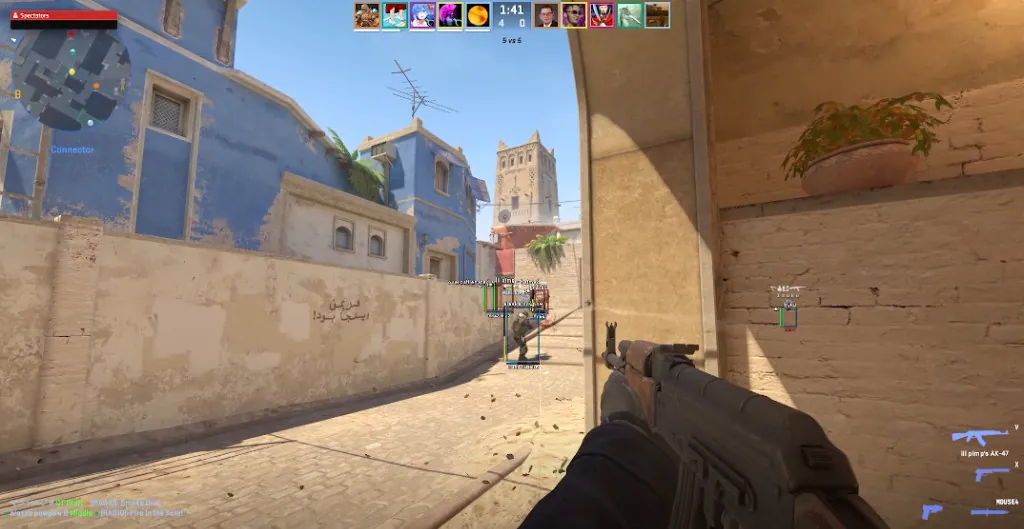
Use the screenshots above for CS2—below is what each layer means and how access works after checkout.

In-game layers

  • Layer A

    Player ESP

    Player ESP with skeleton, box, health, and distance on competitive CS2 maps.

  • Layer B

    Smooth aim

    Smooth aim, FOV control, bone selection, and a visible check for Faceit.

  • Layer C

    Radar

    2D radar beside ESP for quick reads during Faceit rounds.

Guides

Curated articles for setup, tuning, and patch-day checks that match this product.

Config save / load and hotkeys are the only misc options. Save smooth aim and visuals once, then open the menu with a hotkey.

An HWID spoofer rotates how a PC fingerprint appears. It does not remove an account penalty. Read the portal guide before you relaunch.

cs2 dma radar is a map drawn from a hardware read. The radar in this FACEIT menu is a software visual next to player ESP, not a DMA card.

cs2 dma means a hardware read on a second machine. A software loader installs on the game PC and is the easier setup for most people.

cs2 dma cheats read memory from a second device. This guide explains that setup, then why a software FACEIT loader is easier to install.

cs2 aimbot on this FACEIT build is four controls only: smooth aim, FOV control, bone selection, and a visible check.

FAQ

Common questions

Checkout, portal delivery, Windows requirements, and support channels.

Where do I check product status before launch?
Use the Check status page and your portal before you launch—especially after a CS2 or Faceit update.
Something broke right after a CS2 patch—what should I do first?
Check status before you change settings or open a ticket. If the build is updating, wait for the active note. Updates are included while your key is active.
How do I know the module is working on the current client?
Open Check status, confirm the cheat line is active, then run one quiet test before you queue.
Can third-party tools lead to account action?
Yes—any modification carries risk. Faceit and VAC systems evolve. Check status and accept the risk before use.
What is the risk of a hardware ID (HWID) ban?
Client checks can flag your PC profile, not just the account. That can block the same hardware from new accounts until the flag clears or you use a separate tool such as the hardware profile tool. We do not guarantee you will avoid a HWID ban—Check status and only continue if you accept that risk.

Search

↑ ↓ navigate · Enter open · Esc close